
Published
Introducing Mawsim: a WooCommerce marketing calendar and sales goals
Mawsim is live on WordPress.org today, and it is free.
It adds two things to your WooCommerce dashboard. A marketing calendar of the commercial occasions your store actually sells around, and sales goals measured against them. Two widgets put both on your WordPress Dashboard, so the state of the month is the first thing you see when you log in rather than something you go looking for.
The part I care most about is how the goals decide you are behind. Most tools draw a straight line across the period and compare you to it. Your store does not sell in a straight line, and this one does not pretend otherwise.
What Mawsim is
Mawsim is a free WooCommerce marketing calendar and sales goal plugin. It keeps a calendar of the commercial occasions your store sells around, lets you set revenue targets over any period, and tells you whether you are on pace to hit them - measured against your store's own seasonal shape rather than a flat daily average.
That last part is the whole difference. Most sales trackers divide a target by the number of days in the period and compare you to the line that produces. Very few stores sell that way. Mawsim reads the shape out of your own history, so a quiet first fortnight in November reads as normal rather than as an emergency.
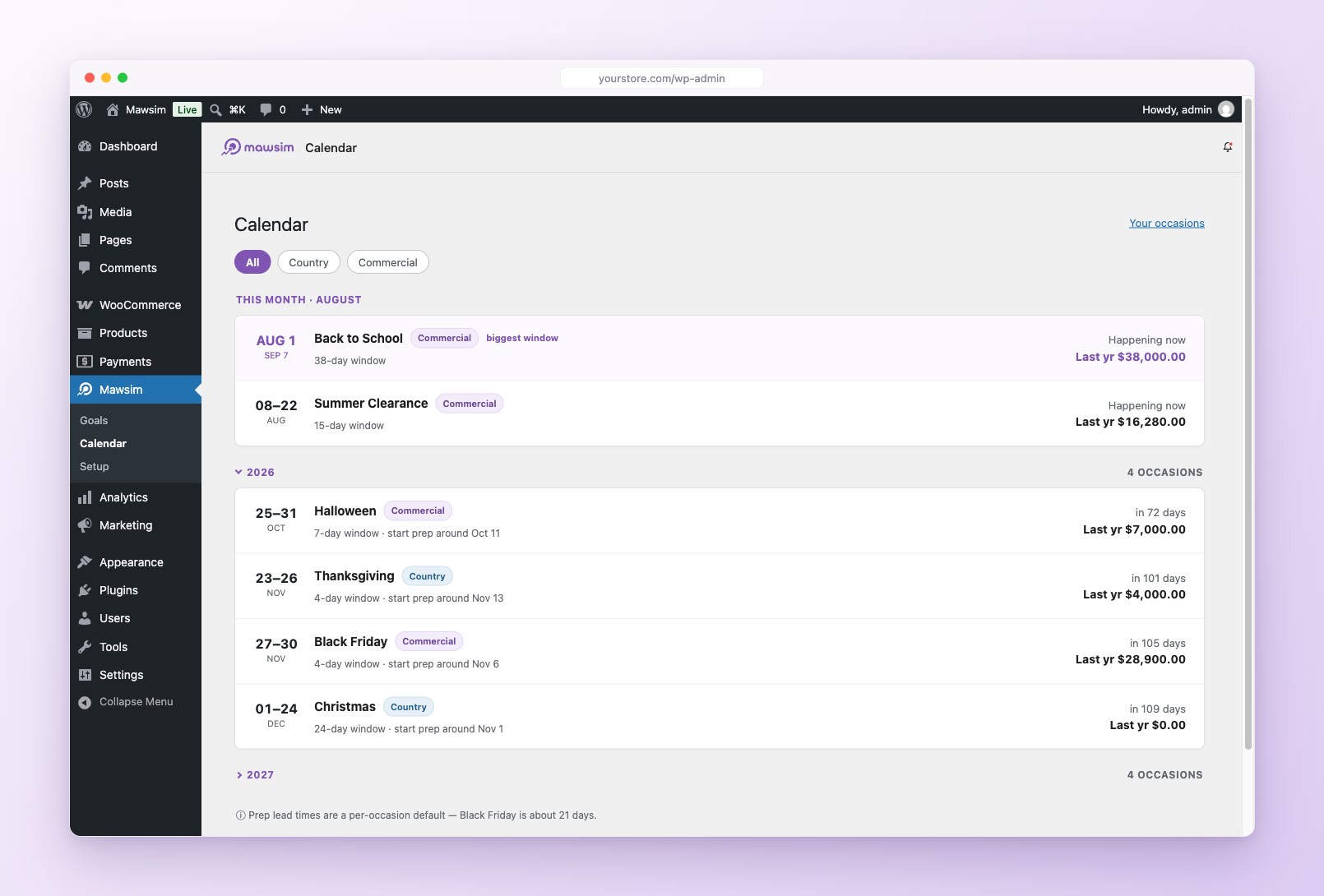
A calendar of the occasions your store sells around
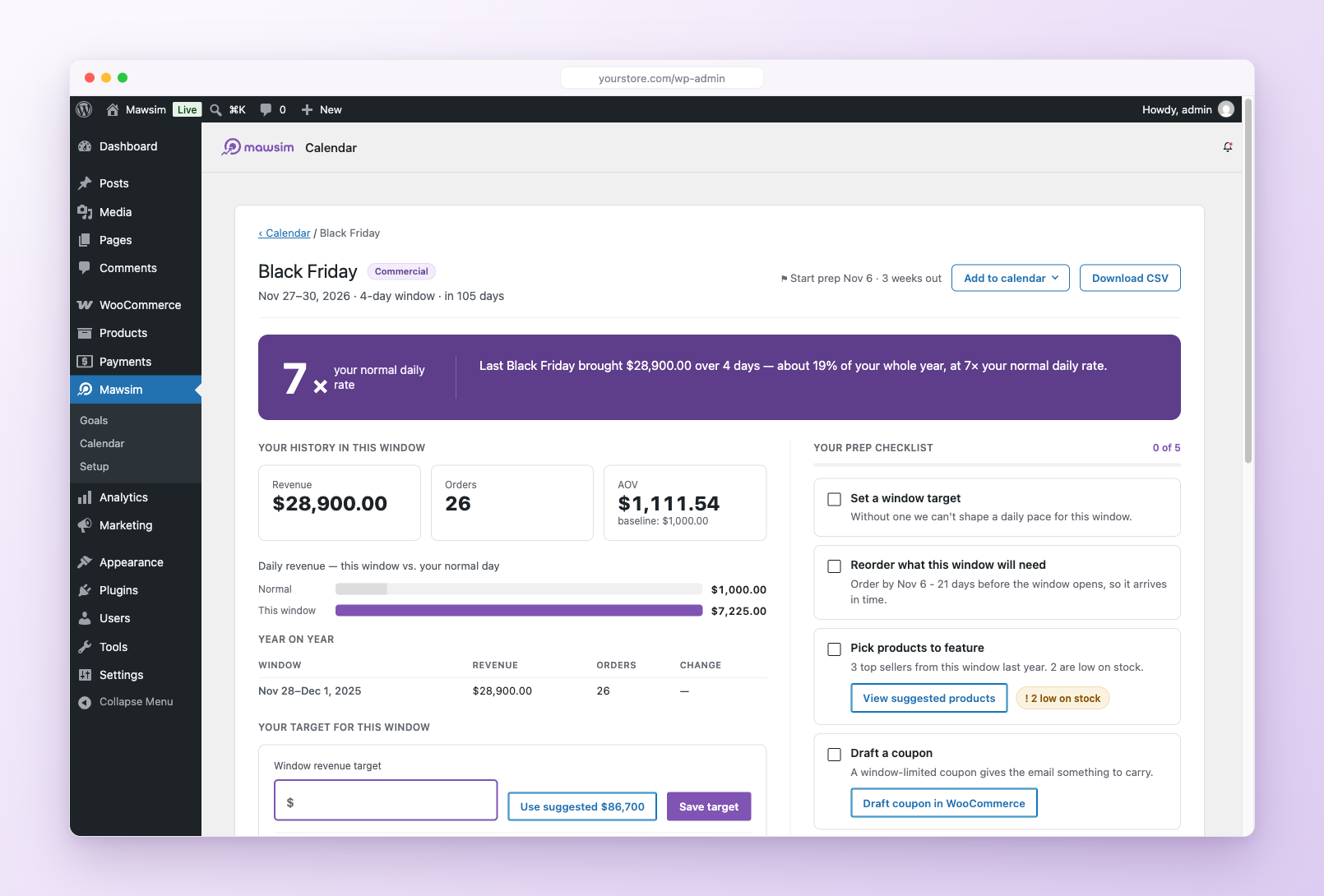
Every store's year has a handful of weeks that carry the rest. The trouble is that the work for those weeks starts long before they arrive, and nothing in your dashboard mentions that Black Friday is sixteen days out and the campaign does not exist yet.
Mawsim's calendar does. It lists the commercial occasions for your store's country, nearest first. Each one carries a window and a prep lead time, and the prep line turns amber when that time is running short. Occasions that follow the lunar calendar, Ramadan among them, are marked approximate, because they are.
The calendar comes from the free Mawsim service. One request during setup, then quiet background refreshes. This release covers the United States, the United Kingdom, Germany, France, Saudi Arabia and the United Arab Emirates. No account, no fee, no key to paste anywhere.
The occasions it ships with are the ones a store actually plans around - Black Friday, Cyber Monday, Ramadan and Eid, Christmas, Valentine's Day, Mother's Day, Back to School - and you can see the whole set on the occasions page. You are not stuck with what the service knows, either. A product drop, a local festival, the anniversary of the shop: add your own occasion once and it behaves like every other one, with its own window, lead time and history. Prefer not to connect at all? Untick the box and build the whole calendar yourself. Everything downstream works the same.
Each occasion gets a page, and the page gets better every year. Mawsim snapshots every window as it closes, so next year the question "what did Black Friday actually do for us?" has a measured answer instead of a memory. There is a suggested play on there too, worked out from your own coupon history rather than from generic advice.
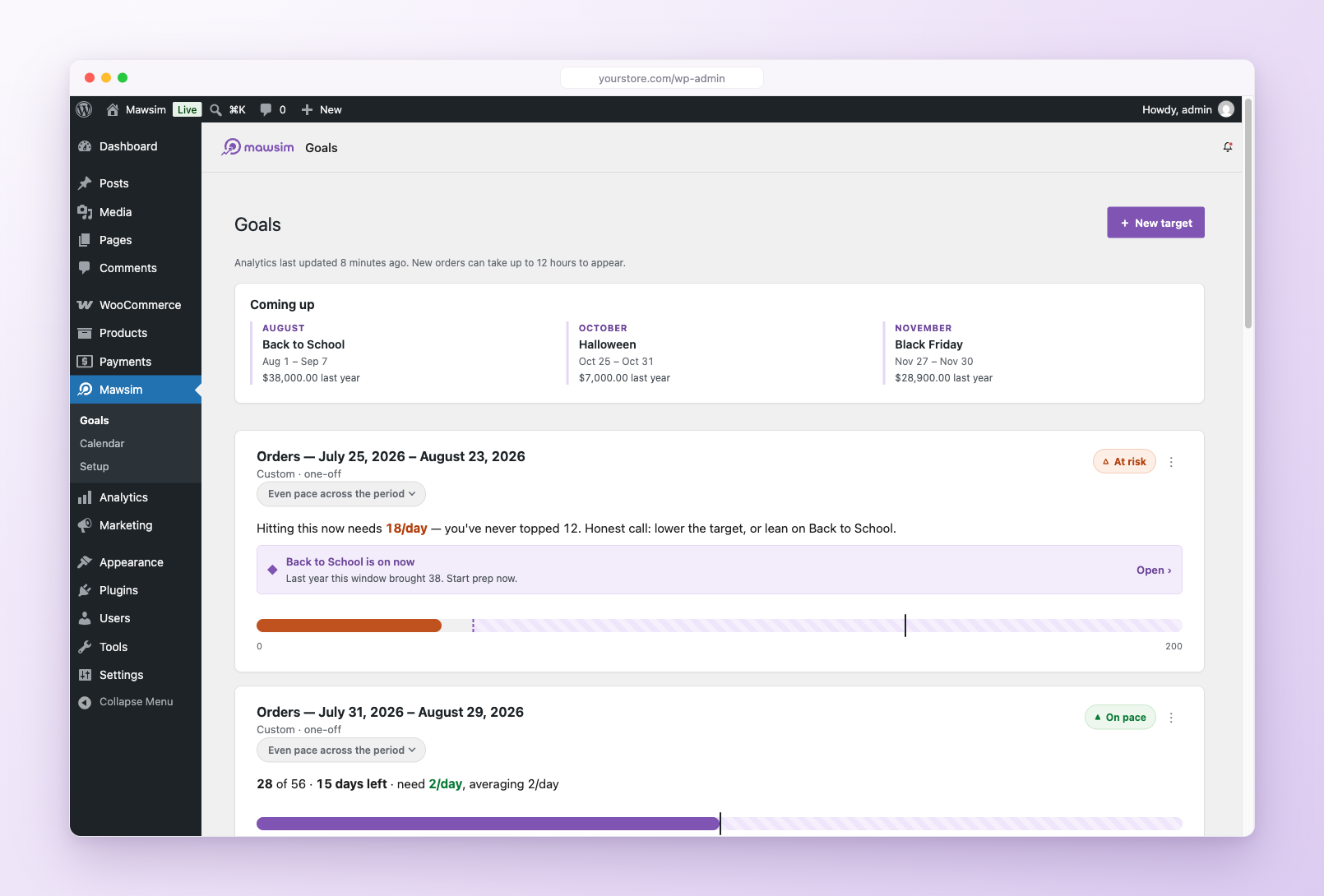
WooCommerce sales goals you can steer by
Adding a goal takes a revenue figure and a period. That is the entire form. From then on it tracks itself against your WooCommerce Analytics data.
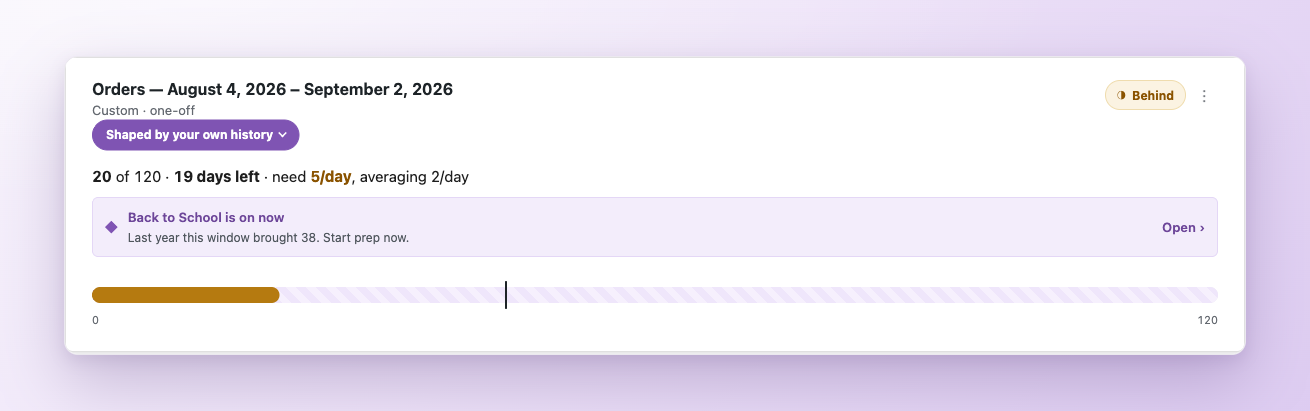
Here is the difference, in one example.
It is 13 November. Your target for the month is 8,000 and you have sold 2,900. A spreadsheet cuts the month into thirty equal days and reports that you are 567 behind. Panic, discount, burn the margin.
But November's money lives in its second half, around Black Friday. A store sitting on 2,900 on the 13th is not behind. It is exactly where it should be. Mawsim measures against the shape of the period, using your own store's last year when it has one, so the quiet weeks stop crying wolf and the warnings you do get are worth reading.
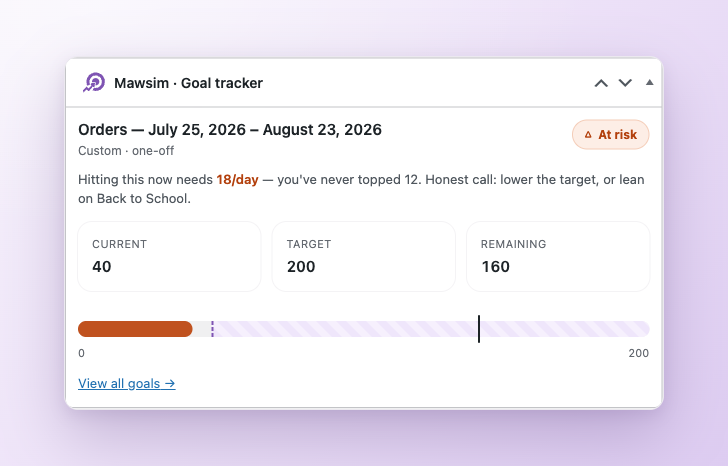
When a goal genuinely needs attention, the card tells you what closing the gap costs: a daily rate, aimed at the next occasion on the calendar big enough to deliver it, with the lead time you have left. "You need 190 a day, and Black Friday is sixteen days out" is something you can act on this afternoon. "62% of goal" is something you can only feel bad about. Every goal carries a forecast, so a gap shows up while there is still time to do something about it.
Two widgets, so you stop going to look
You should not have to open a report to know where the month stands. Mawsim ships two widgets for the WordPress Dashboard, sitting alongside WooCommerce Status and At a Glance.
The goal tracker shows a goal against its pace marker. Clone it once per goal you want to watch and each gets its own card: this month's revenue at the top of the screen, the Black Friday window below it. The Configure link picks which goal a card follows. The cards are drawn with the same components as the Goals screen itself, which is a deliberate bit of plumbing rather than a detail - the widget and the screen cannot drift into disagreeing about your numbers, because there is only one of them.
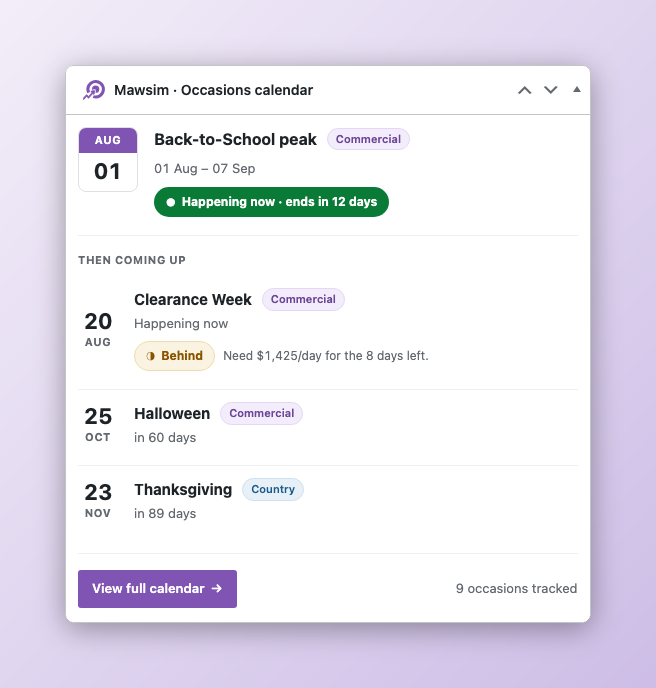
The occasions calendar is the other one, and there is only ever one of it. It leads with the occasion closest to you, its window and its prep clock, and lists what is coming up behind it. It refreshes when you come back to the tab, so a card left open overnight is not lying to you in the morning. Nothing to configure, and nothing to set up: if you do not want it, WordPress's own Screen Options hides it like any other panel.
There is a third surface for people who live in the reports: a Mawsim section in the WooCommerce Analytics Overview, so a goal sits beside the numbers it is measured from.
Why sales goals should not run on a flat line
A flat line is the easy thing to measure against, which is why almost everything measures against it. It is also wrong about most stores for most of the year, and it is loudest exactly when you least need the noise: the quiet fortnight before the week that pays for the quarter.
Shaping the pace is harder to build and it is the whole reason this plugin exists. As far as I know, Mawsim is the first WooCommerce plugin to do it, free, inside your own dashboard, with nothing to sign up for and nothing to export.
Your WooCommerce numbers stay your numbers
Two promises hold up everything above.
Your figures are WooCommerce's figures. Mawsim never computes revenue next to WooCommerce. Every number is read through WooCommerce Analytics' own reporting layer, which means it respects your date type setting, order date or paid date, and your excluded order statuses. Two screens on one site disagreeing about revenue costs you trust in both, so Mawsim is built so they cannot. It is HPOS compatible, works with the Cart and Checkout blocks, and runs on multisite as one independent store per site.
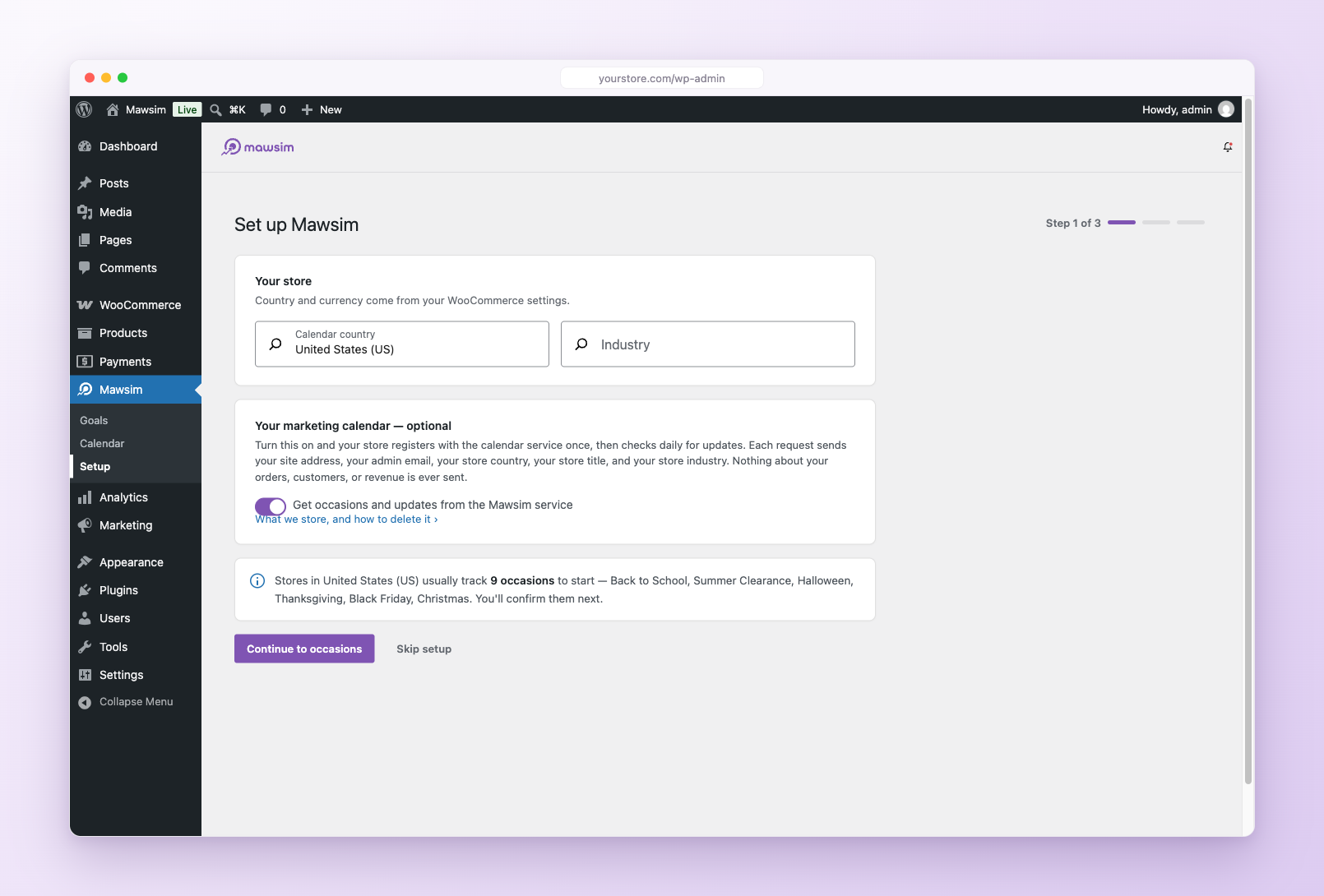
Your data stays on your store. Goals, results and history live in your own database and keep working with the network unplugged. The single outside piece is the calendar, and nothing is sent to fetch it until you agree on the first step of setup. That checkbox sits under a plain list of exactly what would go: site address, admin email, store country, title, industry. Orders, customers and revenue never leave your site under any setting. The optional emails, a monthly digest and occasion prep reminders, are off until you turn them on, sent by your own store to your own admin address, with one-click unsubscribe on every one.
Set up in about a minute
Activating Mawsim does not hijack your screen. When you are ready, open Mawsim > Setup:
- Confirm your country and industry. This is the step with the calendar checkbox. Untick it if you would rather not connect; the calendar still works, built from occasions you add yourself.
- Choose the occasions to track. The list arrives filtered to your country and sorted by relevance to your industry. Untick what you do not sell around.
- Set your first target. A revenue figure and a period.
Three goals worth starting with
- This month's revenue. The obvious one, and the quickest way to watch the shaped line disagree with the flat one.
- Your next big occasion window. A goal set across Black Friday week, or across Ramadan if you sell into Saudi Arabia or the UAE, tells you during the window whether it is working, which is when you can still change it.
- A quiet month. Shaped pace earns its keep where the false alarms are loudest.
This is v1
Everything above ships today. It is the first version, not the finished one, and I am still building: more countries in the calendar, more of the year captured as history, and more ways to slice a goal than revenue over a period. What lands next depends a good deal on what merchants ask for.
So ask. Tell me which occasions your store's year turns on and the calendar does not know about yet, or which goal you tried to set and could not.
Common questions
- What is a WooCommerce marketing calendar?
- A list of the commercial occasions your store sells around - Black Friday, Ramadan, Back to School, a local festival, your own anniversary sale - with the window each one occupies and how long before it the preparation has to start. Mawsim keeps that calendar inside wp-admin and sorts it by whichever occasion is closest.
- How do I set sales goals in WooCommerce?
- WooCommerce has no goals of its own; Analytics reports what happened, not what you were aiming at. Mawsim adds the target. A goal is a revenue figure and a period, and from then on it tracks itself against your Analytics data. See how it works for the whole flow.
- How does Mawsim calculate sales pace?
- From the shape of the period rather than the length of it. Where your store has the same window a year earlier, Mawsim uses your own history; where it does not, it falls back to a published curve for stores like yours, and where neither exists it says so and uses a flat line. The model it used is always labelled on the goal, so a number is never quietly produced a different way than you think.
- Does Mawsim send my order data anywhere?
- No. Orders, customers and revenue never leave your site under any setting. The only outbound request is the one that fetches the calendar, it carries five fields - site address, admin email, store country, title, industry - and it does not happen at all until you tick the box on the first step of setup.
- Are Mawsim's figures the same as WooCommerce's?
- Yes, by construction. Every number is read through WooCommerce Analytics' own reporting layer, so it honours your date type setting and your excluded order statuses. Mawsim never computes revenue beside WooCommerce, because two screens on one site disagreeing about revenue costs you trust in both.
- Is Mawsim free?
- Yes. It is free on WordPress.org, with no account and nothing to sign up for.
- Does it work with HPOS, blocks and multisite?
- Yes to all three. Order data is read through wc_get_orders() and the Analytics query classes rather than the posts table, the Cart and Checkout blocks are declared compatible, and a multisite network runs as one independent store per site.
Try it
Mawsim is free on WordPress.org: install it from your Plugins screen or grab it here. It needs WordPress 7.0, WooCommerce 10.8 and PHP 7.4 or later.
The rest of it lives at mawsim.store. Questions, bugs, or a season your store follows that the calendar has never heard of: the support forum or mawsim.store/support.